What MDM is, and why schools use it
Mobile device management in plain English: what it does for school iPads, Chromebooks and laptops, what the DfE standard says about it, and what it does not do.
Checked 6 November 2026
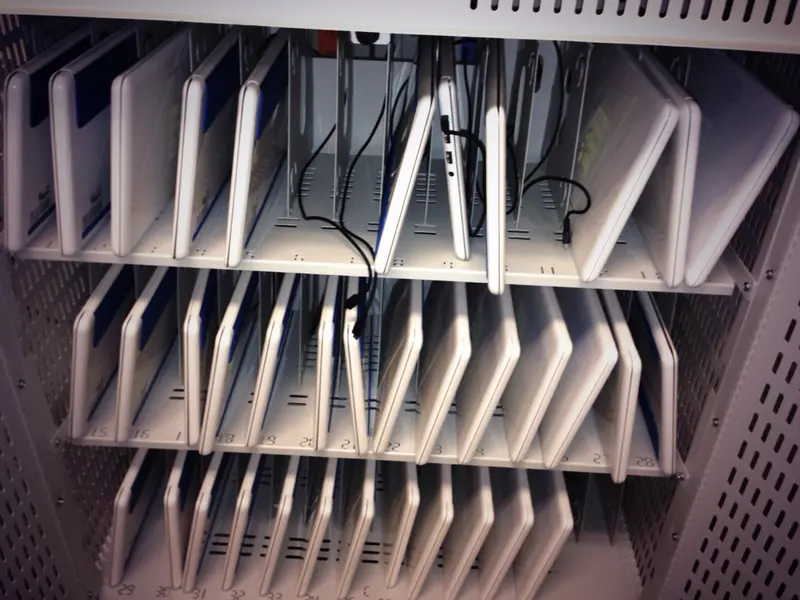
Mobile device management (MDM) is a service that lets a school’s IT support set up, configure, update and secure its devices from one central console, instead of handling each iPad, Chromebook or laptop by hand. When a device is lost or stolen, MDM can also lock or wipe it remotely.
If you are new to it, the easiest way to think of MDM is as the school’s “remote control” for its devices. It can’t make a device safe on its own, but most of the other things a school needs — filtering, monitoring, app licences, updates — depend on devices being managed.
What the DfE standard says
The Department for Education’s standard for laptops, desktops and tablets says devices should be centrally managed by IT support. In its words, central management includes making sure security and safeguarding policies are applied consistently, applying security patches, recording up-to-date information in the asset register, and controlling browser access through technical policies.
It then says: “Mobile and portable devices should have mobile device management to minimise safeguarding and security risks.” It explains that this means IT support can remotely manage devices, including locking or wiping them and securing apps and software. The standard says this part “should be met now for all laptops, desktops and tablets currently used”.
The same standard says all new devices must be compatible with your existing filtering, monitoring and security systems, and that a data protection impact assessment (DPIA) should be done for existing devices and whenever new ones are bought. We cover the wider standards in The DfE standards and KCSIE: what they say about devices.
These are Department for Education documents for schools and colleges in England. Schools in Scotland, Wales and Northern Ireland should check their own government’s guidance.
What MDM does day to day
The exact features depend on the platform and the service you choose, but the jobs are broadly the same:
- Enrolment. New devices are linked to the school’s management service, ideally automatically the first time they are switched on. Apple calls this Automated Device Enrolment; Google calls it zero-touch enrolment for ChromeOS devices; Microsoft uses Windows Autopilot and other enrolment methods.
- Settings and restrictions. Wi-Fi details, passcode rules, which apps and features are allowed, and which websites the browser can reach.
- Apps. Installing and updating the apps each year group needs, without pupils needing their own app store accounts.
- Updates. Keeping operating systems patched. The DfE cyber security standard expects high-risk vulnerability fixes to be applied within 14 days of release.
- Lost and stolen devices. Locking, wiping or (on some platforms) locating a device.
- Inventory and reports. Seeing which devices you have, who has them and which software version each one runs.
The three main platforms
Each of the big three has its own route in:
- Apple — Apple School Manager is a web portal that works with a device management service of your choice. It is not an MDM by itself. See Apple School Manager and MDM, explained.
- Google — Chromebooks are managed in the Google Admin console once they are enrolled with ChromeOS Education Upgrade. See Managing Chromebooks with the Google Admin console.
- Microsoft — Intune for Education is Microsoft’s cloud MDM service for schools. Microsoft says its portal covers Windows 11, Windows 11 SE and iOS/iPadOS devices, and that the full Intune service supports Android, iOS, macOS and Windows. See Microsoft Intune for Education: an overview.
Many schools use an independent MDM service that manages more than one platform. We don’t rank or recommend vendors: features and prices change, and the right fit depends on your devices, your IT support and your trust’s existing systems.
What MDM doesn’t do
MDM is not the same as web filtering. The DfE filtering and monitoring standard describes filtering as preventative (blocking harmful content) and monitoring as reactive (alerting staff to concerning activity). MDM is often how those tools are deployed and kept switched on, and the DfE standard lists “device monitoring using device management software” as one way to monitor school devices — but you still need an appropriate filtering and monitoring service, and staff still need to supervise.
MDM also doesn’t replace good records. The DfE standards expect an asset register with serial numbers, who each device is assigned to and when it was disposed of. See Asset registers, labels and locks.
Privacy and being open with users
Managed devices can reveal a lot. On a supervised iPad, Apple shows a message in Settings saying the organisation “can monitor your internet traffic and locate this device”. The DfE filtering and monitoring standard says technical monitoring systems should notify users that the device is being monitored, and that monitoring should be reflected in your acceptable use policy and privacy notices. A DPIA is the right place to think this through.
Questions to ask before you choose
- Which devices and operating systems do we have now, and what will we buy in the next few years?
- Do we need shared devices, 1:1 devices, or both? (See Shared or 1:1 devices?)
- Does the service work with our filtering and monitoring tools, and with our identity system (Google Workspace or Microsoft Entra ID)?
- Who will run it day to day — in-house staff, the trust, or an IT support company?
- How are licences paid for, and when do they renew? The DfE cyber standard asks schools to record licence expiry dates in a contracts register.
The DfE’s free Plan technology for your school service can help you check where you stand against the standards.
Sources
- DfE: Laptops, desktops and tablets standard (updated 16 January 2024) (checked 6 November 2026)
- DfE: Filtering and monitoring core standard (updated 16 September 2026) (checked 6 November 2026)
- DfE: Cyber security core standard (updated 16 September 2026) (checked 6 November 2026)
- Apple: Intro to Apple School Manager (checked 6 November 2026)
- Apple: About Apple device supervision (checked 6 November 2026)
- Google: Enroll ChromeOS devices (checked 6 November 2026)
- Microsoft Learn: What is Intune for Education? (checked 6 November 2026)
- NCSC: Device security guidance (checked 6 November 2026)
Checked 6 November 2026. This guide is general information, not legal, safeguarding or procurement advice. Official guidance changes, so check the sources before you act.